USABILITY
Jump to Usability Test Results
TEST PLAN
The purpose of this evaluation will be to assess the usability of the finalized Giftly app and to verify whether the design decisions made during development successfully addressed previously identified usability issues. The evaluation aims to identify remaining usability problems, validate improvements and inform potential refinements to the app's design, navigation and features.
1. Heuristic Evaluation - Nielsen's 10 Usability Heuristics
A heuristic evaluation based on Nielsen's 10 usability heuristics was conducted on the initial Figma prototype. It was carried out by two evaluators who independently reviewed the prototype and identified usability issues. Each issue was assigned a severity rating on a scale from 1 (minor) to 3 (severe).
The results of this evaluation helped in defining the initial hypotheses and the general design of the user test as well as a few changes made from the initial prototype to the actual app on which the testing will be conducted. Among the changes was the feature to mark a gift as "gifted" and also a new icon for the "add gift" buttons as well as clear cancel buttons for forms.
| Heuristic | Severity | Problem | Mentions |
|---|---|---|---|
| User control and freedom | 3 | Lacking cancel buttons and clear options for going back. | 2 |
| Visibility of system status | 1 | No sidebar to show how far in a list you've scrolled | 1 |
| Consistency and standards | 2 | There is no clear identifier for buttons | 2 |
| Help users recognize, diagnose, recover from errors | 2 | The options for deleting items if you've made a mistake are not very clear | 1 |
| Match between the system and the real world | 1 | It might not be clear to users that they have options to swipe, e.g. between screens | 1 |
| Visibility of system status | 3 | No way for users to see when an item has been added to a list or whether that item has been checked off. | 1 |
Severity Scale: 1 = Minor, 2 = Moderate, 3 = Severe
2. Hypotheses / Testable Questions
2.1 Testable Questions
- Can users navigate through the app and return to previous screens without difficulty?
- Do users correctly identify which elements are interactive throughout the app?
- Do users understand and use gesture based navigation where applicable?
2.2 Hypotheses
- Users may experience difficulty navigating back or canceling actions in certain parts of the app.
- Some interactive elements may not be immediately recognizable to users.
- Users may attempt alternative interaction methods before discovering gesture-based navigation
3. Data to be Collected (dependent Variables)
3.1 Quantitative Data - Dependent Variables
- Single ease Question (SEQ) - score after each task
- System Usability Scale (SUS) - score after completing all tasks
- Errors - incorrect taps or actions by participants
3.2 Qualitative Data
- Observed behavior and hesitations
- Verbal comments made during task execution
- Survey with open-ended questions where participants can share their thoughts after each section of tasks
3.3 Forms
4. Methods
The test will include 4-6 participants between the ages of 18 to 30. Participants are expected to have prior experience using mobile applications and ideally be active "gift-givers". No prior knowledge of the Giftly app is required. Participants will be asked to complete 5 tasks split into two sections. After each task there will be an SEQ and after each section 5 open-ended questions where participants can share their thoughts. Post-test the SUS questionnaire and some verbal feedback will be collected. Each session will be conducted individually and will last approximately 20-30 minutes.
4.1 Material and Tools
- Giftly app via device provided by orchestrators
- Consent form & demographics (Google Forms)
- Task description provided verbally to participants
- Single Ease Question (SEQ) questionnaire (Google Forms)
- System Usability Scale (SUS) questionnaire (Google Forms)
- Qualitative Survey (Google Forms)
- Screen recording of the test sessions
4.2 Tasks
- 1.1 Imagine a close friend's birthday is coming up, add them and their information to your library.
- 1.2 You have a gift idea for that friend, please add it to their list.
- 1.3 You remembered something and want to add a new note to the gift, please do so.
- 2.1 Now, please navigate to the countdown screen in order to see how many days exactly are left until your friend's birthday.
- 2.2 Lastly, please add another birthday to the calendar. (You don't have to create a new person.)
4.3 Pilot Test
A pilot test was conducted in the forming of this test plan which helped in defining the tasks, methods and questionnaires. Further it helped clarify what instructions might be unclear for the participants and what needs to be simplified or expanded on. The pilot test is not included in the data.
RESULTS
1. Demographics
A total of five participants took part in the study. All participants were between the ages of 20 and 25 years old, with 80% identifying as women and 20% as men. All participants reported having average experience with mobile applications but none had used an app for gift organization in the past. A majority of participants reported giving gifts to more than 5 people yearly, while the rest answered that they have 10 or more people they regularly give gifts to. These stats align well with the target users of Giftly and therefore provide valuable knowledge of a possible future user-base.
2 Quantitative
2.1 Errors & SEQ
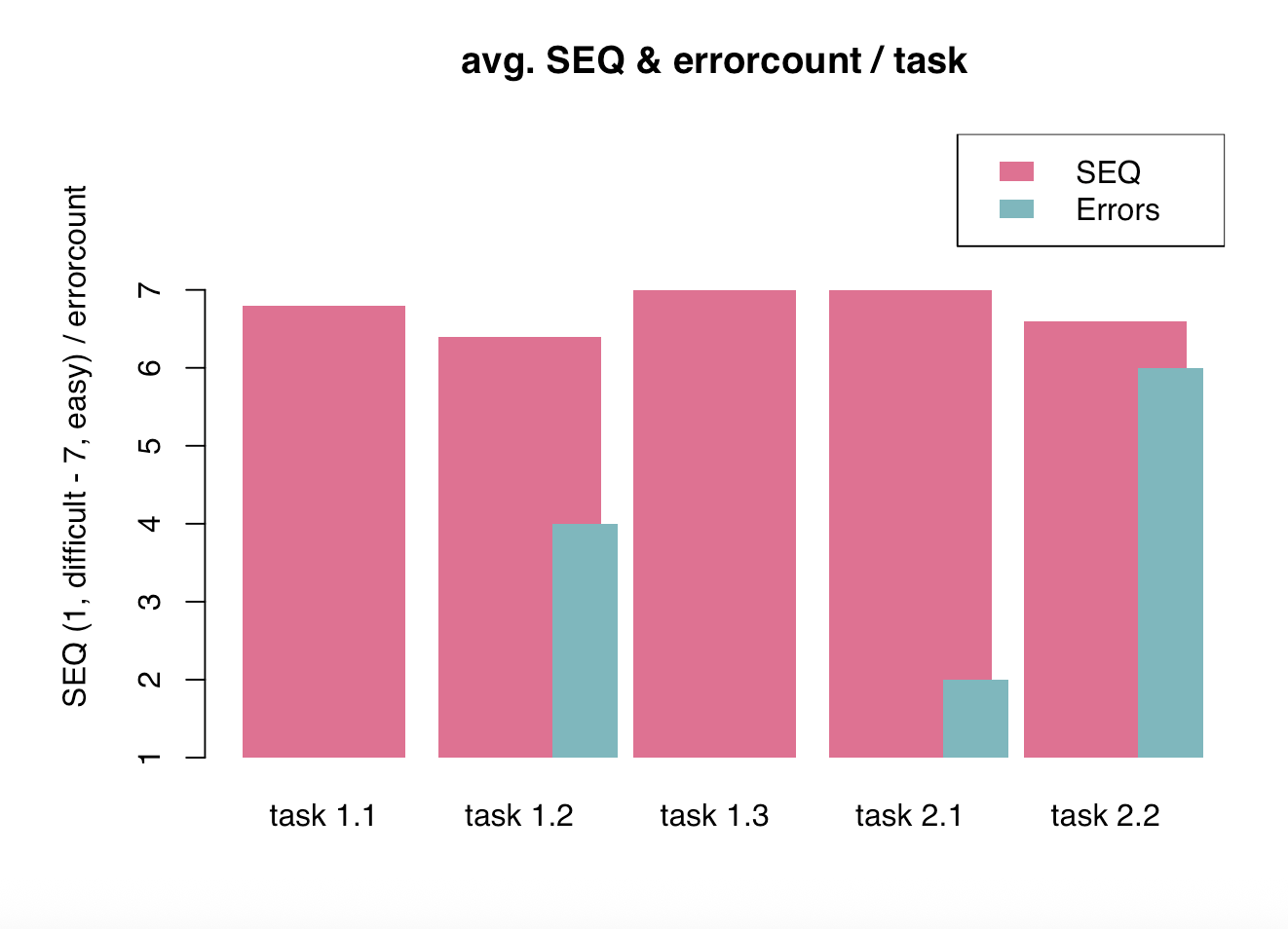
The results SEQ and error count revealed a generally positive usability outcome, with all tasks receiving an above 6 average ease-of-use rating. Tasks involving interactive elements like adding a gift (Task 1.2) and adding a birthday to the calendar (Task 2.2) showed increased error rates compared to other tasks. These correspond to a minor drop in SEQ scores, however, the score still remains high enough to suggest errors were easily recoverable and that users maintained confidence.
2.2 System Usability Scale (SUS)
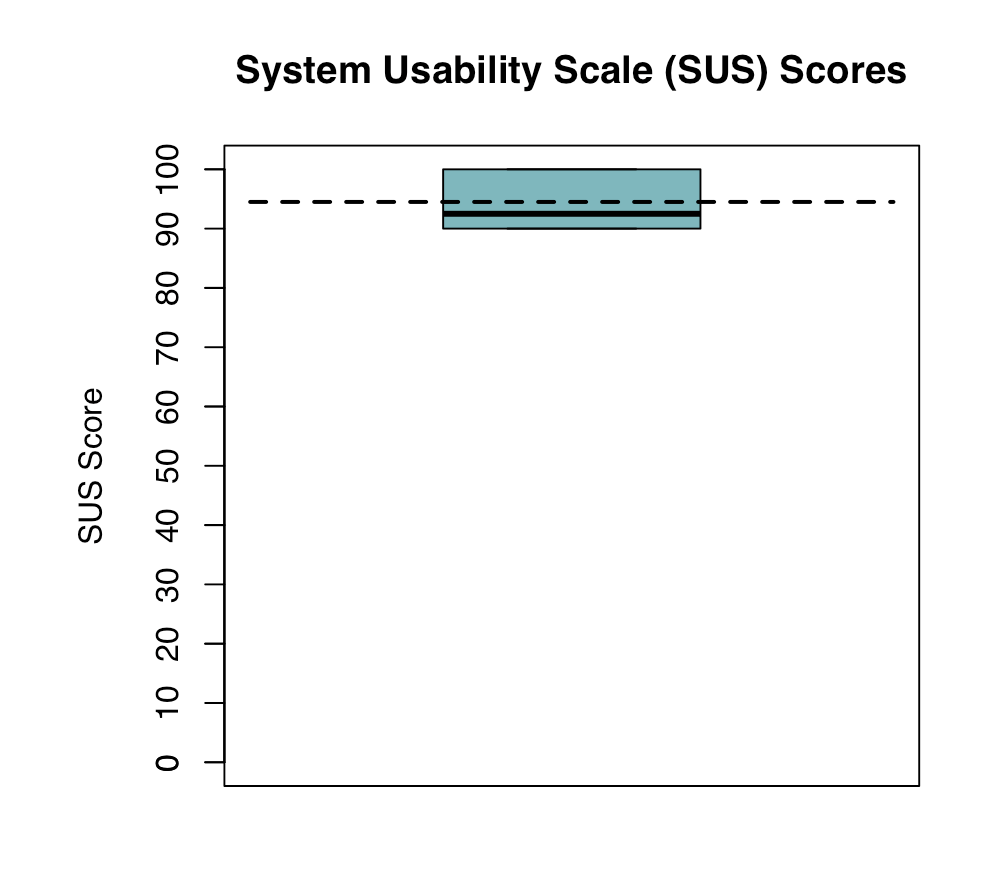
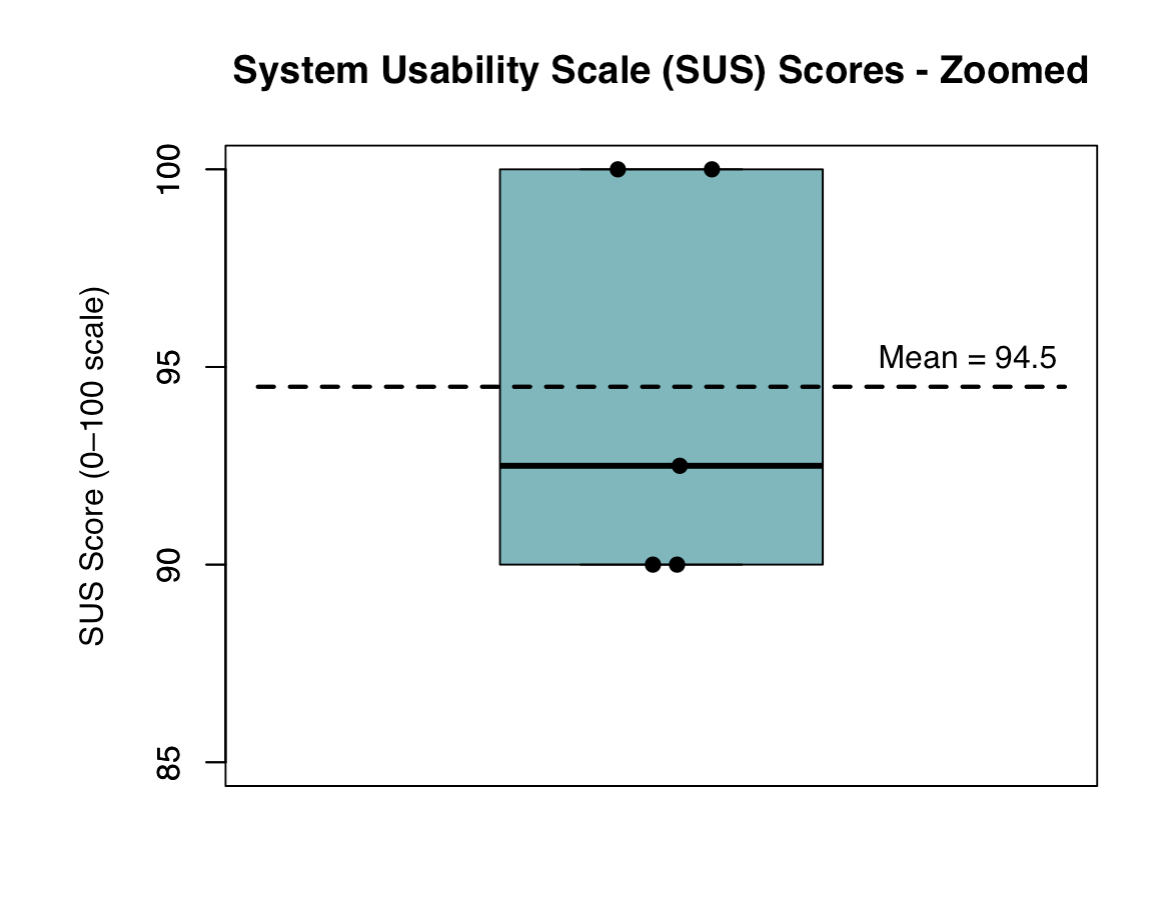
SUS scores ranged from 90 to 100, with a mean score of 94.5, placing the app above the average usability benchmark of 68. All participants reported high levels of confidence, ease of use, and perceived consistency when interacting with the system.
3. Qualitative
Participants reported a very positive experience across both task sections, frequently describing the app as "intuitive", "easy to use" and "smooth to navigate". Navigation to the calendar was also frequently mentioned, with several participants noting the swipe-based navigation as enjoyable once discovered.
Recurring issues included confusion with the plus (+) confirmation icon, and uncertainty when adding birthdays via the calendar. Gesture-based interactions were sometimes not immediately noticed, and misclicks occurred when adding gifts due to the search bar.
4. Evaluation of Hypotheses
Users generally recovered from errors independently, not supporting the first hypothesis. Interactive elements were sometimes not immediately recognized, supporting the second hypothesis. Several participants tried alternative interaction methods before discovering swiping, supporting the third hypothesis.
5. Improvements and Updates to the Interface
Based on the insights gathered from usability testing, the calendar now allows adding birthdays by clicking a date or using the plus button. Further, icons were added for distinguishing between events and birthdays as well as some clarification to the edit and delete options for events. Confirmation buttons were changed from plus (+) icons to checkmarks for clarity. The search bar is hidden when a gift list is empty to guide users to the "add gift" button. Gesture-based swiping was not modified, as most participants discovered it naturally and the menu provides a reliable fallback.